The best way to create a good habit is to automate it so you never have to think about it again.
James Clear, Atomic Habits
In my work helping clients secure their Microsoft cloud services, I learn something new almost every day. Undocumented quirks, easy-to-make mistakes, and hard-earned best practices rattle around my head like so many loose screws in a toolbox — screws I carefully select when crafting each deliverable.
To reduce friction and improve consistency, I figured automation could help me produce better deliverables with less effort.
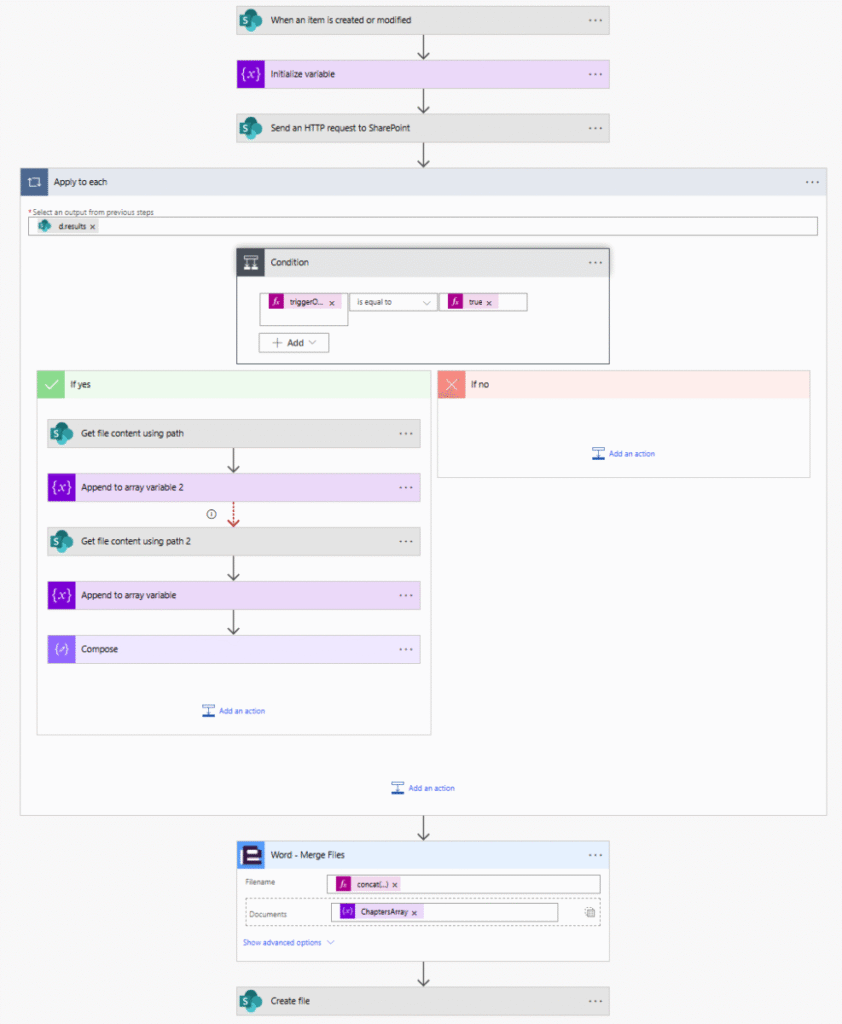
Not every client needs every topic covered. So I built a SharePoint list with Boolean checkboxes for 34 security configuration topics across Azure, Intune, Entra, Purview, and Office 365. I then built a Power Automate Flow that triggers whenever a list item is created or modified, assembling the relevant topic documents into a personalized client deliverable.
Some security configurations are client-specific, so I allow topic documents to be overridden with customized versions found in dedicated client folders.
This system helps me deliver greater value while giving my best practices a more permanent home. Feel free to reach out if you want a closer look!
After working through some quirks in SharePoint list item parsing and content encoding, the final Power Automate flow:
- Triggers when a list item is created or updated.
- Retrieves which content flags are enabled.
- Loads the corresponding Word documents from SharePoint folders.
- Merges them using Encodian’s Word – Merge Files action.
- Outputs a client deliverable ready for review.