
All roads lead to Rome.
Alain deLille

When it comes to meeting CMMC requirements, every Defense Industrial Base (DIB) organization’s journey looks a little different, but most follow one of three main roads to compliance in GCC High.
1. Split Organization (Some Users Move to GCC High)
This approach is popular among companies that handle Controlled Unclassified Information (CUI) in only a few departments, such as engineering or contracts, or that don’t want non-US users provisioned in the GCC High tenant. In these cases, the CUI-handling U.S. users move to GCC High for secure collaboration, while others stay in Commercial Microsoft 365. It minimizes cost and disruption, but introduces complexity around directory sync, Teams collaboration, and licensing.
2. Secure Enclave (CUI Users Have Two Identities)
Here, all users keep their Commercial accounts, and CUI users receive a second account in GCC High. It’s flexible, since anyone can work in GCC High when needed. However, the user experience suffers: two identities mean double the password, MFA, and device management challenges unless carefully automated. And the fidelity of the cross-cloud Teams experience is a bit degraded.
3. Full Commitment (All In GCC High)
This is the simplest for long-term compliance and control. Everyone operates in the same secure environment, eliminating data spillage risks and simplifying policy enforcement. And everyone enjoys the full collaboration capabilities of Microsoft Teams. While it requires the most upfront effort, it provides the cleanest path to future audits and collaboration in Teams.
No choice is wrong. The tendency is toward Full Commitment.
I’ve worked with organizations that have embarked on all three of these roads. Operating across tenants does incur some loss of fidelity. Over time, companies either carefully mitigate these issues (e.g., Identity Bridge, Multi-Tenant Teams Configuration) or move to Full Commitment.
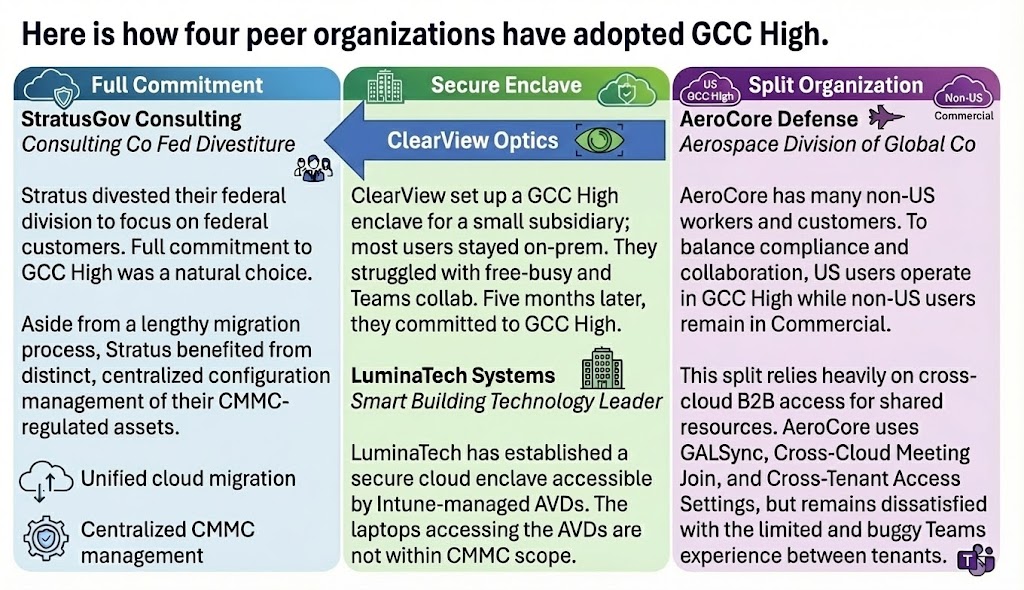
Each model can succeed with the proper planning, licensing, and identity strategy. The key is to design your approach around where CUI lives, how your teams collaborate, and your organization’s will to change.
If you’re unsure which model fits your environment, let’s talk. I offer a free consultation to help you chart the right path to CMMC readiness in GCC High.
This post is the fourth in a series on common challenges organizations face when adopting Microsoft 365 GCC High.
- Teams Collaboration: Simple, Reliable Cross-Cloud Teams Collab in GCC High.
- Device Management: Understand Intune’s gaps in GCC High and how to configure a virtual enclave for secure access without issuing new laptops.
- Firewall Management: Understand how to use the Azure Firewall to protect a CMMC-compliant secure enclave of Azure Virtual Desktops (AVDs).
- What Others Are Doing: Understand how others are using GCC High to achieve CMMC compliance.
- Teams Collaboration 2: Integrating Teams External Access, Cross-Cloud Meeting Join, and B2B for a complete collaboration experience.
- Data Protection: What’s missing today in Microsoft Purview when it comes to protecting sensitive Defense Industrial Base data.
- App Development: Lessons learned building applications spanning Commercial, GCC High, and 21v China.
If these topics resonate, stay tuned — each post will dig into practical solutions and lessons learned from real-world projects.