
Just because it has a saddle, doesn’t mean you should ride it.
Unknown
Previously: How to configure cross-cloud Teams collaboration for B2B Guests. Below: How External Access, Cross-Cloud Meeting Join, and B2B fit together.
Many GCC High applications and features are not supported or are limited. This article specifically focuses on the limitations of Teams External Access for cross-cloud collaboration. Cross-cloud Teams behavior is more restricted than cross-tenant Teams behavior within the same cloud. The loss of group chat is the most significant limitation (loss of emoji’s is another) and may prevent your organization (or its externally focused users) from fully committing to GCC High. You want to secure your business. But you want to ensure you still have a business to secure. The documentation says it works. You enable External Access in settings, test a chat with someone from another org — it works! You check the box and move on to the next project.
Wrong.
Teams External Access for cross-cloud collaboration is the tiger with a saddle. It works for simple chat and calling, but the moment your users need to actually collaborate — react to a message, add someone to a group discussion, share a file in a meeting, work together in a channel — they can’t. And suddenly you’re explaining to frustrated executives why they can’t work normally with external partners despite “working for months to get this working”. Organizations may drive to get everyone into GCC High to optimize internal collaboration, but you should be aware of the limitations of external cross-cloud Teams collaboration.
Note: External Access is limited, but it does work. People getting started with GCC High sometimes assume that cross-cloud Teams chat is not possible. It is possible, but it does require a verified domain and DNS records for standard federation. For any Microsoft Teams organization to chat with an external organization, regardless of cloud type, the SRV record for federation must exist in public DNS. Select ONE of the entries below depending on whether your domain is registered in a Commercial or GCC High tenant.
Commercial tenant SRV record
- Service: _sipfederationtls
- Protocol: _tcp
- Port: 5061
- Target: sipfed.online.lync.com
GCC High tenant SRV record
- Service: _sipfederationtls
- Protocol: _tcp
- Port: 5061
- Target: sipfed.online.gov.skypeforbusiness.us
If these records are missing, the tenant is effectively invisible to external federated chat requests.
Gotcha #1: Changing to a verified domain may require some extra steps.
Federated chat requires a verified domain to host these SRV records. After changing a user’s domain from an onmicrosoft domain, you may need to hard refresh the browser, log out and back in, or log in using an InPrivate/Incognito session to see the custom domain appear in the Me control in the top-right corner of the Teams window.
Gotcha #2: A legacy SRV record may interfere with external federation.
Despite not being a documented requirement, if this SRV record exists, it must be changed to point to the GCC High endpoint.
- Service: _sip
- Protocol: _tls
- Port: 443
- Target: sipdir.online.gov.skypeforbusiness.us
My Recommendation: Make maximal use of Teams and cross-cloud B2B: Teams External Access for casual external contact, Cross-Cloud Meeting Join for governed meetings, and Entra ID B2B Guests for serious collaboration (group chats, file sharing). For completeness, I present two other solutions. All three approaches can coexist. All three can be explained to a C3PAO.
- Mainly GCC High – Swivel to Commercial When Needed: Some organizations follow a “GCC High Unless” model, provision most of their users in GCC High because they are not quite sure where CUI is being handled, and employ a dual-account/swivel-seat model for users who also need full-fidelity Teams collaboration with Commercial users.
- Mainly Commercial – Swivel to GCC High When Needed: Some organizations follow a “Commercial Unless” model, provision most of their users in Commercial because CUI handling is a small part of their business, and, to comply with CMMC without issuing new hardware, deploy a secure enclave in GCC High for handling CUI.
My recommendation for users to use one account for everything is simpler for users (what account did I use for that?) and is based on three facts:
- Users have crystal clear expectations for real-time, high-fidelity Internet collaboration.
- Microsoft has clearly communicated its focus on B2B vs. Teams Shared Channels and Cross-Cloud Meeting Join.
- B2B Guest accounts enable a medium-fidelity, governed Teams experience, the best cross-cloud compromise achievable today.
Crystal Clear Expectations
Enterprise users expect Teams to work. When someone can’t share a file over Teams, they don’t file an IT ticket. They email the file. Like in 2005.
Teams External Access is inadequate for serious cross-company collaboration – especially when collaborating across clouds. The inability to share files or add external users to group chats cripples collaboration. Today’s teams naturally span organizations: your architect is a contractor, your PM from a partner, your SME from the client. When you need to loop Sarah into the budget discussion or add Tom to the API thread, you don’t think about whether they are internal or external. Teams External Access limitations shatter this. Every attempt to add someone or share a file hits an invisible wall — and people don’t know why. By contrast, B2B does require upfront planning through Teams and channels, that’s where a designated responsible person assembles the team and ensures everyone has access. But once everyone’s in, the team works. No one has to think about where a person’s W2 is issued. External Access never lets you forget: some colleagues are permanently second-class citizens in the organization that happens to host the collaboration.
Now, Teams External Access does serve as an essential bridge for users from external organizations where serious user-level collaboration has not yet been configured. In this case, you have someone who is essentially a stranger unable to receive files or be added to ad hoc chats. Not great, but not a total outrage.
Strangers –> External Access:
Casual external contact, presence awareness, persistent chat with individuals across clouds
Meetings –> CCMJ:
One-off meetings, sales calls, when you need authenticated identity and Conditional Access enforcement for external attendees
Collaboration –> B2B:
Ongoing partnerships, project teams, file sharing, group chats, Teams channels — any serious collaboration
Don’t stop at External Access. It handles initial contact but can’t support real collaboration.
CMMC Controlled Unclassified Information (CUI) Requirements
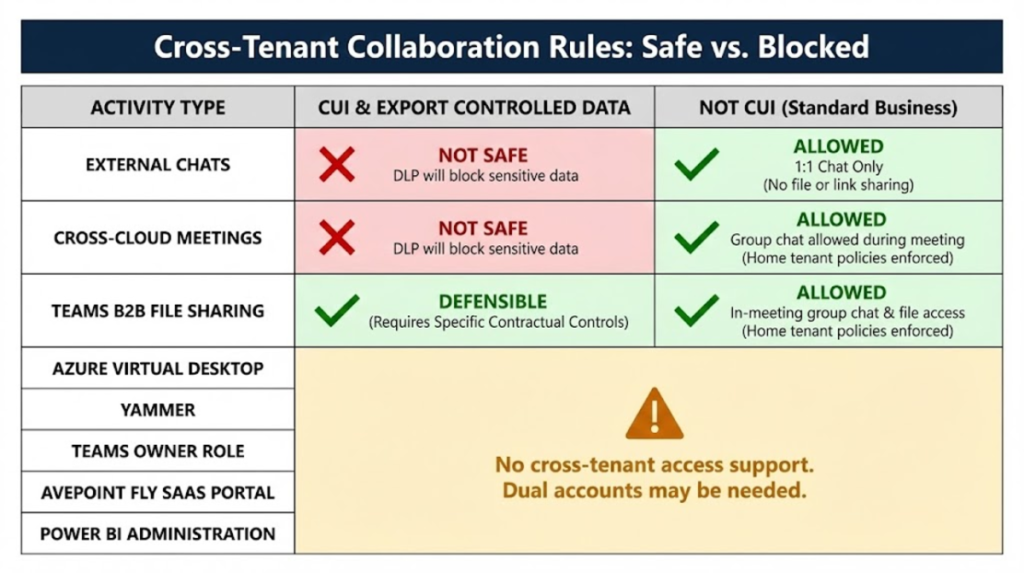
We’ve covered collaboration fidelity, but we haven’t discussed data security. We are talking about GCC High because you need to control the storage and movement of CUI. This is another reason to be skeptical about Teams External Access and Cross Cloud Meeting Join. You can configure DLP to block exfiltration of CUI from your GCC High environment, but having an actual Commercial B2B Guest User in a GCC High Team enables much more control over access and storage of CUI (this could be the topic of a future Purview GCC High Deep Dive). Here is a table that shows the safety/feasibility of cross-tenant CUI access.
Cross Cloud Teams Chat Fidelity
Despite the tiger and words like “inadequate” and “crippling”, my friend at an aerospace company said I was understating the limitations of cross-cloud Teams chat for GCC High users that need to collaborate with users in Commercial tenants. So let me be very clear: DO NOT UNDERESTIMATE the impact of taking away external group chatting from your sales and supply chain users as they move to GCC High. B2B brings these capabilities back at the cost of some upfront planning. An ounce of prevention in the form of well-defined Teams, Access Packages, and user education can head off a storm of complaints from migrated users. Here is a two-minute video that lays out the differences between same-cloud and cross-cloud chats.
Microsoft’s B2B Focus
Microsoft’s putting its development weight behind B2B: Teams Shared Channels don’t support GCC High, Cross-Cloud Meeting Join handles meeting authentication, Entra ID B2B allows file sharing and chatting with groups of internal and external cross-cloud users in Teams Channels. They’re showing you where the future is. For maximum leverage, put your heaviest dependencies where Microsoft is making their heaviest investments.
Medium-Fidelity and Governed
B2B isn’t perfect. Tenant switching is a pain. However, it does provide the highest-fidelity experience possible today for cross-tenant collaboration — especially between Commercial and GCC High tenants. In addition, B2B users can be included/excluded in policies and integrated into governance workflows. And governance is vital to organizations subject to CMMC. B2B isn’t perfect — but it’s the only option that works for serious cross-company collaboration.
This is the fifth in a series on common challenges organizations face when adopting Microsoft 365 GCC High.
- Teams Collaboration: Simple, Reliable Cross-Cloud Teams Collab in GCC High.
- Device Management: Understand Intune’s gaps in GCC High and how to configure a virtual enclave for secure access without issuing new laptops.
- Firewall Management: Understand how to use the Azure Firewall to protect a CMMC-compliant secure enclave of Azure Virtual Desktops (AVDs).
- What Others Are Doing: Understand how others are using GCC High to achieve CMMC compliance.
- Teams Collaboration 2: Integrating Teams External Access, Cross-Cloud Meeting Join, and B2B for a complete collaboration experience.
- Data Protection: What’s missing today in Microsoft Purview when it comes to protecting sensitive Defense Industrial Base data.
- App Development: Lessons learned building applications spanning Commercial, GCC High, and 21v China.
If these topics resonate, stay tuned — each post will dig into practical solutions and lessons learned from real-world projects.